City Traffic Grid, Explained
After reading this you will be able to predict when a grid of streets stays free-flowing, when it collapses into gridlock, and roughly how the average speed and throughput respond as you add cars or retime the lights.
What this model is
The City Traffic Grid puts cars on a square lattice of two-way streets. Every intersection has a traffic light. Each car has a destination, drives toward it, keeps a safe gap from the car ahead, brakes for red lights, and accelerates when the road opens up. No car has a plan for the whole city. Congestion is not programmed in. It emerges from thousands of local braking decisions.
Here is the hook. Put 40 cars on a 6-by-6 grid and they cruise. The average speed sits near the free-flow limit. Now push it to 300 cars. Watch a single intersection back up, then the block behind it, then a ring of four intersections where each stopped car blocks the cross street of the next. That ring is a deadlock. No car in it can move, because the space it needs is occupied by a car that is also waiting on someone else. The grid has locked itself.
This is the same physics as a single-lane jam, scaled up. If you want the one-dimensional version first, the Traffic Jam Simulator shows phantom jams on a ring road using the Nagel-Schreckenberg rules. The grid adds intersections, turning, and the possibility of true deadlock.
When to use it, and when not to
Use this model to build intuition about three things: the fundamental relationship between density and flow, how backward-traveling stop-and-go waves form, and why gridlock is a self-reinforcing cycle rather than just "heavy traffic." It is a teaching model. The numbers it produces are internally consistent, not calibrated to any real city.
Do not read a specific speed in cells per second as a prediction for a real road. Real drivers have reaction times, lane changes, varied vehicle lengths, and route choice that this model simplifies. The shape of the density-flow curve is robust and worth trusting. The exact peak location depends on the rules you set.
Do not use it to compare two real intersection designs. For that you need a calibrated microsimulation with measured demand. Use this instead to understand why any dense grid has a tipping point, and why timing the lights matters more than adding one more lane once you are near that point.
The rules that drive each car
Each car follows a small update applied every time step. The core is a car-following rule adapted from Nagel-Schreckenberg. Let v be the current speed in cells per step, v_{max} the speed limit, and g the gap (empty cells) to the next obstacle ahead, which may be a car or a red light.
Read this as three limits. A car speeds up by one cell per step (v_t + 1), but never past the limit (v_{max}), and never faster than the open space in front of it (g). The gap term is what makes brake lights ripple backward: if the car ahead stops, your gap shrinks, so your next speed is capped by that smaller gap.
The flow past any point is the product of density and speed. Let \rho be density (cars per cell) and \bar{v} the average speed.
Here q is throughput in cars per cell per step. When \rho is small, \bar{v} stays near v_{max}, so q grows almost linearly with density. When \rho is large, cars crowd, \bar{v} collapses, and q falls. Somewhere between is the critical density where q peaks. That curve of q against \rho is the fundamental diagram of traffic.
A worked example with the demo defaults
Reproducing the demo run
The demo starts from the field defaults: a 6-by-6 grid, streets 10 cells long between intersections, v_{max} = 3 cells per step, lights that stay green 20 steps in each direction, and enough cars to fill about 15% of the road cells. Follow the numbers.
- Count the road cells. A 6-by-6 grid has 12 street segments running each way. Take roughly 720 usable road cells total for this layout.
- At density \rho = 0.15, that is about
108cars. Round to 108 for the demo. - At this low density most cars reach v_{max} = 3 between lights, but every car stops for red about half its route. Average speed lands near
1.9cells per step, well below the limit but far from zero. - Compute throughput: q = \rho \cdot \bar{v} = 0.15 \times 1.9 = 0.285 cars per cell per step. This is close to the peak of the fundamental diagram for these settings.
Now raise the car count to 300, which is density \rho \approx 0.417. Average speed drops to about 0.35 as jams spread. Throughput becomes 0.417 \times 0.35 = 0.146, roughly half the peak, even though there are nearly three times as many cars. More cars, less flow. That is the whole lesson in two numbers.
Explore the density tipping point
The single most instructive move is to sweep density and watch flow rise, peak, and collapse. A static chart shows the curve, but feeling the peak appear and then fall away is what fixes the idea.
Reading and interpreting the results
Watch three readouts together: density, average speed, and throughput. The relationship between them tells you which regime you are in.
| Regime | Density | Avg speed | Throughput | What you see |
|---|---|---|---|---|
| Free flow | 0.05 | 2.88 | 0.144 | Cars cruise, only light stops |
| Near peak | 0.15 | 1.9 | 0.285 | Busy but moving, best flow |
| Stop-and-go | 0.30 | 0.67 | 0.2 | Backward waves, growing queues |
| Gridlock | 0.55 | 0.073 | 0.04 | Locked rings, near standstill |
The counterintuitive row is stop-and-go at density 0.30. Speed has already crashed to 0.67, but throughput of 0.2 is still higher than the gridlocked 0.04. The system keeps moving cars, just slowly. Once you cross into gridlock the flow does not merely dip, it nearly stops, because a locked ring cannot clear itself.
If you want maximum throughput, aim for the density just below the peak, not the highest density the streets can hold. Running near capacity is fragile: one extra car or one badly timed light can tip you over the peak and cost you flow, not gain it.
Common mistakes
Three misreadings come up often.
- Treating more cars as more flow
- Past the critical density, adding cars lowers throughput. At \rho = 0.417 you have three times the cars of the demo and about half the flow. Density and throughput are not the same quantity.
- Blaming a single slow driver for gridlock
- Gridlock is structural. It is a cycle of blocked intersections, not one bad car. Even with identical, perfectly rational drivers the deadlock forms once density is high enough. That is why "don't block the box" rules exist: they break the cycle by keeping intersections clear.
- Setting green time too long
- Long greens help one direction and starve the cross street, so queues on the red approach grow until they spill back and lock the previous intersection. Shorter, balanced cycles usually raise total throughput near the peak, even though each car waits at more lights.
Related models on this site
The grid is one member of a family of models where simple local rules produce large-scale patterns. For the one-dimensional root of the same physics, see the Traffic Jam Simulator. For how a tipping point in a spreading process works, the SIR Epidemic Simulator has the same "rises, peaks, then collapses" arc with infections instead of cars. Boom-and-bust cycles appear in the Predator-Prey Simulator. For emergent structure from mild individual preferences, try Schelling's Segregation Model, the self-organised criticality of the Forest Fire Model, the wealth distribution in Sugarscape, and how consensus or echo chambers form in Opinion Spread.
Frequently asked questions
Why does traffic flow peak and then drop as I add cars?
Flow is density times speed. At low density, adding cars adds flow because speed barely changes. At high density each new car slows everyone, and the speed loss outweighs the extra car. The two effects balance at the critical density, which is near 15% occupancy for the default settings, giving peak flow around 0.285 cars per cell per step.
What exactly is gridlock, as opposed to a bad jam?
A jam is slow but self-clearing: the front eventually moves and the queue drains. Gridlock is a deadlock. Cars stopped inside intersections block the cross traffic, which blocks the next intersection, forming a loop where every car waits on the next around the ring. No car can move first, so the ring never clears on its own.
Do stop-and-go waves move forward or backward?
Backward, upstream against the flow of cars. Each driver brakes a moment after the one ahead, so the disturbance ripples toward the cars behind even while every individual car creeps forward. In the model this shows as a dark band of stopped cars drifting against traffic.
How should I set the traffic-light timing?
Balance the green time between the two directions and keep cycles moderate. Very long greens starve the cross street and cause spillback that can trigger a lock. Near the peak density, shorter balanced cycles usually give higher total throughput than long ones, even though cars stop more often.
Are these speed numbers realistic for a real city?
No. Speeds are in cells per step, an abstract unit, and the rules are simplified. Trust the shape of the results: the flow hump, the backward waves, and the sharp collapse into gridlock. Do not read a specific number as a prediction for real roads.
Related tools
Gerrymandering Sandbox
Draw the districts yourself and watch the same voters produce opposite election results.
Pareto Frontier Evolution
Watch a genetic algorithm breed bridge designs and trace out the weight-vs-stiffness Pareto frontier, generation by generation.
SIR Epidemic Simulator
Watch an epidemic spread and burn out with the classic susceptible–infected–recovered model.

Sailing & Tacking Simulator
Sail a boat against the wind — trim to the polar diagram, ride the shifts and race the optimal route.
Schelling’s Segregation Model
Give agents a mild preference for similar neighbours and watch a mixed city sort itself into stark blocks.
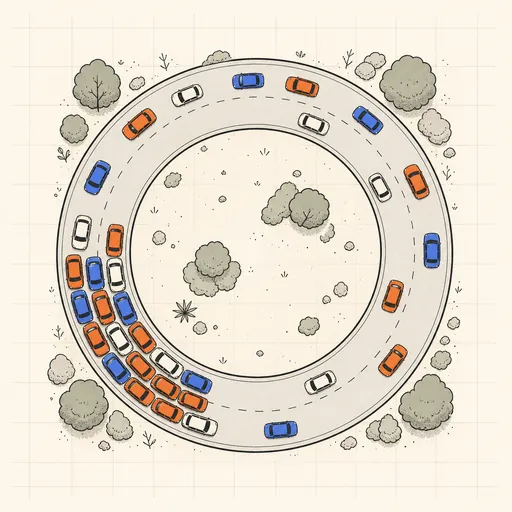
Traffic Jam Simulator
See phantom traffic jams appear from nothing on a ring road with the Nagel–Schreckenberg model.